Showing posts with label lightwaverf. Show all posts

Monday, 25 September 2017

Ring Video Doorbell WIBNIF (Wouldn't It Be Nice IF.....?)

I will admit that I am a gadget lover, and have had considerable experience with various gear over the years. That being said, there have been instances when my purchase of a gadget had been influenced by real/true/genuine necessity rather than curiosity. When I moved home a few years ago, I fould that the analogue door bell that was in place was useless. It was a wired set-up but the bell was placed, still, in the entrance hall. Even after cranking its volume or adjusting the solenoid, it was still inaudible when one is upstairs. Moving the bell anywhere was going to mean running long cables.

Now my first solution was obvious. I had the house already set with LightwaverRF smart lighting, smart power sockets and heating (www.lightwaverf.com). This is one of the cheapest, easy and yet stable smarthome solutions (if one does not want to tinker with Domoticz). So it  was a no-brainer not to consider LightwaverRF's door bell offering, which came at about £30. What you get is a traditional metal bell (solenoid hit) and a push button to install at the door. The good thing is the two work wirelessly (433Mhz RF like all other LightwaveRF lighting products) and the bell is battery powered by 2 CR232? batteries which can last for almost a year.

Image result for lightwaverf bell
LightwaveRF Door Bell set

You get to pair the push button wiith the bell, and you can place the bell anywhere in the house, and indeed its loud enough. Mine I hanged it up in the stairway,  hanging on just a single wall nail/screw.

I also paired the bush button with my bedroom lights, and set it so that when someone rings, the lights flash (on-off-on-off) These settings are set by 4 small switches at the back of the push button, so you can check the manual to set them according to your desired lighting response,

My main issue with this bell was, it was quite expensive for what it offered. The flickering of lights was quite mundane because you would not notice it on a bright day, and also was not necessary as long as the bell was still working, save for cases when your bell battery goes flat without your knowledge, which should be quite a rare event.
This bell was markerted as a LightwaveRF wireless bell, but there was nothing smart about it. There are better wireless bells with a mains plugged chime (no need to buy batteries) which cost £6 online.
I would have loved a situation where this bell could notify me via the LightwaveRF app, whenever the bell was rung, but alas. I have the same issue with LightwaveRF's door/window magnets, they are quite dumb.
I tried to search IFTTT (www,ifttt,com) for recipes that use the bell push or the magnetic switches, but there are none. It seems you can only use these 2 products to activate lights when the push button is pressed or when the door is opened, no push notification or anything else.
At least ifttt recipes would have been better, but you cannot select the 2 devices as sources because LightwaveRF's devices are passive, and STATELESS! They do not communicate their state (eg. is light on? is door open? etc, you cant make such queries)

So what I decided on was to try something better in terms of functionality. I therefor sold my LWRF bell on ebay for £24 gross (that was a good sell)
I bought the much talked about Ring Video doorbell (www.ring.com), the battery operated one. I bought mine from Argos, which sells the bell bundled with a chime unit (the sounder) for £169, but I had a £10 voucher which any Argos customer can get hold of easily, so it costed me £159 for both. The chime is around £24 separately, so it means I got the bell for £135, which is a very good find. Also Argos  offers buy-now-pay-later for 6 months on this, so thats slightly over 20 quid per month, interest-free. Thats equivalent of me skipping my after-lunch coffee for just 2 days per week, honest its worth it.

Image result for argos ring door bell and chime bundle
Ring Video Door Bell and Chime set

Now on to the Ring itself, the device is well made and quite sturdy. At the time of this writing, Ring has just released its second version of the door bell called "Ring Video door Bell 2" From what I can tell, this new video door bell only differs with the original in that it records videos in 1080p (instead of 720p), is a bit slimmer (not thinner!) and removable batteries. On the downside it comes with slightly reduced field of view (FOV) There could be another subtle differences but I believe I have mentioned everything thats worth highlighting.

You connect your bell and chime to your wifi network. The chime will sound when the door bell id pressed. this happens over wifi, so if either of these disconnects to wifi, no ding dong sound for you.

WIBNIF 1. Chime and bell should have had their own direct RF signal for communication.

Also when the door bell is pressed you receive a notification on your phone (same with motion detected by the way...) You can then answer the doorbell by tapping on the notification and voila,... you are talking to your PPI sales guys, or The Watch Tower brethren or even your Royal mail delivery guy (one-way video and 2-way audio)

The major flaw in this design is the LAG that exists between button pressing and receiving of notification. This means if your home broadband is not fibre and has high latency, and you are away from home, chances are that you will answer the doorbell when the delivery guy (who happens to be in a hurry to meet his quotas) is gone, or you may be luck to see his back as he leaves.
I must say however, Ring has been working very happy to reduce this delay to acceptable levels. I think they are making sure that the device does not go into deep sleep, which however sucks the juice outta the battery, I want to see the mods that ring are making to address this issue....
My setup so far, after a lot of tweaking, has a delay of around 7 seconds, which is acceptable and in most cases I have been able to catch the delivery guy just as he dragged his first step off and in other cases I simply had to say a loud hello on answering.

So what other WIBNIFs does this system have?, well, if you install this as your first ring product, it becomes apparent very quickly.

WIBNIF 2. extra bell push button, to sound the chime?

Imagine if you have multiple access ways to your property, or just a simple back garden or kitchen door. Wouldn't it be nice to have a simple bush button to install at these extra access ways, so that it sounds the chime? Most of the time you would not really need another video doorbell at these points, so a simple push button would have been enough.

Ok, from my comparison with the newer version, you probably have picked up that these doorbells are battery powered. This original one has no way of charging the battery without dismounting the doorbell from the wall. I will not comment about the removable battery in 2nd version.

The Ring Video door bell and other Ring cameras, are compatible with IFTTT, meaning you can do clever triggers and actions based on motion detection. This is a very welcome features for these devices. You can turn on lights when someone rings the bell,or when motion is detected. You can even use Alexa recipes.
They are also compatible with Smartthings, so one can use security smart-apps in Smartthings, to trigger the alarm when motion is detected outside normal hours.

It should be noted that Ring devices record videos to the cloud, and you have o pay something like £25 a year per each device, to be able to use this feature. There is no local storage, leading to my next wibnif

WIBNIF 3. sdcard slot for local recording?

It would have been nice if these devices were able to record locally to an sd card and offer an option for user to not use their cloud platform.

Overall Ring video bell is a well made product which is being letdown by technology employed, which inherently introduces delays. If the door bell could talk directly to chimes, at least the system would be very usable EVEN only as an expensive wireless intercom, without the bells and whistles of being an internet enables device.

Sunday, 8 January 2017

Amazon's Alexa - smart home voice assistant

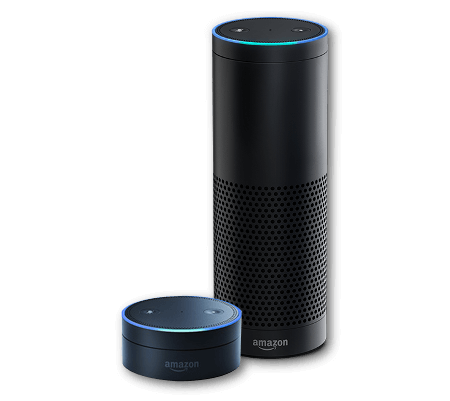
Alexa has been with us for some time now. I have been able to play around with it. I currently have 2 Amazon Echo Dots.

According to Wikipedia "Alexa is an intelligent personal assistant developed by Amazon.com's Lab126, made popular by the Echo. It is capable of voice interaction, music playback, making to-do lists, setting alarms, streaming podcasts, playing audio books, and providing weather, traffic and other real time information. Alexa can also control several smart devices using itself as a home automation hub.[2] Most devices with Alexa allow users to activate the device using a wake-word (such as Echo), other devices require you to push a button in order to activate listening-mode. Currently, interaction and communication with Alexa is only available in English and German."
I hope that statement give a quick glance at what this device is really about, and whether it might be for you.

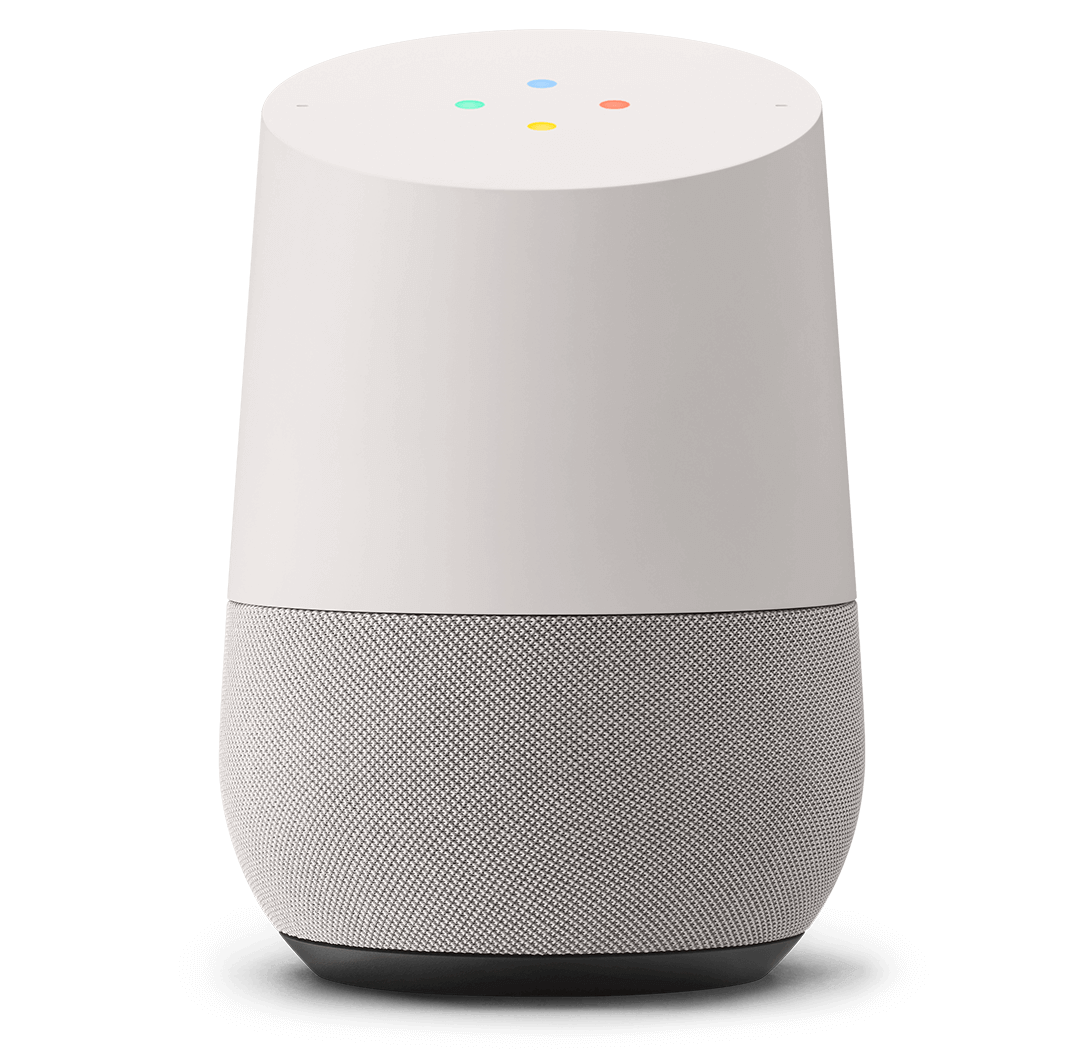
There are other voice assistance on the market and the main competitors to Alexa are the Google Home Assistant and Apple's HomeKit.


amazon-echo-glamour-v1.png
Amazon Echo (Taller) and Echo Dot (smaller)
straight-on.png
Gooogle Assistant
homekit.jpg


Apple Homekit
The following tables gives a summary of  current devices and systems which are compatible to each of the 3 offerings. The tables are written in the format of the "Smart Home Scoreboard for  CES2017" from which can be found at https://www.cnet.com/news/a-smart-home-scoreboard-for-ces-2017/
Tables in that link are continuously updated everyday, so the information here is a snapshot of information on that link.


Compelling smart device compartibility
Amazon Alexa
Apple HomeKit
Google Assistant
Belkin WeMo Dimmer
Chamberlain Smart Garage Hub
Belkin WeMo Dimmer
Whirlpool appliances
Leviton Decora light switches
Hyundai
Dish Hopper DVR
Honeywell Lyric Home Security and Control System
Chrysler 300
Element 4K TV

Nvidia Shield TV
LG Smart Instaview Refrigerator

Nvidia Spot
Ford Sync3


Mattel Aristotle by Nabi child's smart speaker


Hydrao smart showerheads


Samsung SmartThings kit


LightwaveRF Dimmaers and sockers


Compatible systems which are “Not bad”
Amazon Alexa
Apple HomeKit
Google Assistant
Samsung Powerbot VR7000 robot vacuum
Sylvania Multicolor smart bulb
Belkin WeMo Mini smart plug
WeMo Mini smart plug
Kwikset Premis smart lock
Coway Airmega air purifier
Omaker Wow speaker
Lifx Plus smart bulb
Switchmate Bright smart switch
Lenovo Smart Assistant speaker
ConnectSense Sensors
Switchmate Power smart plug smart switch
C by GE Lamp
Fibaro sensors
Sensory Voice Genie
Coway Airmega air purifier
First Alera Onelink Environment Monitor

First Alera Onelink environment monitor
Netatmo Smart Smoke Alarm

Somfy One security camera
Withings Home Plus WiFi cam

C-Way Memoo child's smart speaker
Carrier Cor smart thermostats

Switchmate Bright smart switch
D-Link Omna 180 Cam HD

Switchmate Power smart plug smart switch
Sensory Voice Genie

Hubble Hugo camera
Yale Real Living Assure Locks

Carrier Cor smart thermostats
Yale NexTouch Wireless Locks

Huawei Mate 9 phone
Incipio CommandKit WiFi Smart Wall Switch

Incipio CommandKit WiFi Light Switch


Incipio Command Kit Smart PowerStrip


Cambridge Nightengale


ADT Pulse


Sensory Voice Genie


Onkyo VC-FLX1


Mayfield Robotics Kuri


Gimmicky
Amazon Alexa
Apple HomeKit
Google Assistant
iDevices Instant Switch

LG Hub Robot


Ubtech Robots Lynx


Bixi


What you can do with Alexa?
The following is an example list of things that you can say or ask Alexa.
"Alexa, whats my day like tomorrow?"
"Alexa, tell Lizzy a bedtime story"
"Alexa, tell me a joke"
"Alexa, play Christmas music"
"Alexa, who is Michael Jackson?"
"Alexa, wake me up at 7 in the morning"
"Alexa, ask Skyscanner for a flight to New York"
"Alexa, ask The Telegraph for the top stories"
"Alexa, how's my commute?"
"Alexa, shuffle my Favourites playlist"
"Alexa, turn it up"
"Alexa, will it rain tomorrow?"
"Alexa, read my audiobook"
"Alexa, what's on my calendar today?"
"Alexa, what's the weather in London?"
"Alexa, play Taylor Swift from Amazon Music"
"Alexa, turn on the coffee machine"
"Alexa, turn on all the lights"
"Alexa, switch on main bedroom lights"
"Alexa, set the master bedroom to 20 degrees"
"Alexa, what's in the news?"
"Alexa, ask Uber to request a ride"
"Alexa, open Just Eat and ask for my last order"
"Alexa, ask Jamie Oliver for a recipe"

My setup
I have 2 Echo dots, One in the living room and the other one in my bedroom. I can use the one in the living room if I am in the Kitchen, provided there is not too much noise (like loud music playing), but it works all the time.

To be able to ask Alexa the above question and get expected answers, one need to activate the relevant "skills". Skills are software intelligence that recognises the context and subject of the questions, and know how and where to fetch the data to be able to respond to the pondered question. Say if you have your own product that you want to be compatible with Alexa, you can program a little piece of  software specifying the questions that people should ask, and then code the necessary response of your device, in form of actions (e.g. movements if its a mechatronic device, or database fetches, is its data requests)

I use most of the default skills that come enabled with Alexa, and I have activated a few more. I have the SmartThings and LightwaveRF smarthome kits (see previous posts). I connected and activated these skills in my Alexa, so I am able to do the following;
 - Switch on/off or dim lights (e.g. "Alexa set living room lights to 20 percent")
 - Switch on/off electrical sockets (thus controlling devices connected to those sockets)
 - Switch on/off heating


LightwaverRF and SmartThings Skills

The above systems are the key to the success of Alexa in my house. My visitors are always in awe of how I control devices and lights in my house by just using my voice.
At the moment no other home assistant is compatible with LightwaveRF system, so Alexa is ahead of the game at the moment.

If you have any interesting tricks, skills and features that you want to share or discuss, please leave a comment.

Saturday, 28 November 2015

SmartThings home automation kit


It has been a long time before posting anything on this blog. This was so, because of a lot of activities and responsibilities that I have been engaged in since late last year. However, that has not stopped me from playing around with a lot of tech. over the months, I have had pleasure trying out a number of prototype smart watches, liquor dispensers (really?...lol)  some new smartphones and cars.

You may have followed my earlier posts on home automations from some 3 or 4 years ago, where I used to talk of smart tvs, before they became mainstream, also X10 home automation, and probably the LightwaveRF kit which has been the central lighting and heating control system in my home.

Recently I got my hands on the Smart-things home automation kit by Samsung.


Smart-things kit


This kit is really dynamite, which comes in small packages, but with ability to do much much more...
The starter kit, which is the most basic set of devices that can get you started, usually consist of;
- a hub, which is the main brains and control centre,
- a on/off socket that can be plugged onto wall sockets and then in turn be used to control(switch on of any connected appliances)
- a motion sensor (which also doubles as a temperature sensor)
- a multi-sensor which can work as a magnetic open-close sensor as well as a temperature sensor.
- a presence sensor, which registers its presence whenever its in proximity to the hub.

The smart-things kit is based on industry standards like z-wave, which makes it compatible with other existing devices and sensors. This allows one to buy other sensors from other manufactures, which can be used or controlled via the smart-things hub.
These can be;

  • smoke detectors/alarms, 
  • door bell/chimes, 
  • heating control systems, 
  • other light bulbs,
  • network/ip wireless cameras
  • other security systems
  • etc etc
The best part is, all smart-things devices can be controlled via your smartphone, using a very sleek and responsive app, whether you are at home or away.


SmartThings Android App


You can also integrate your smart-things kit with IFTTT (if this then that) and use the already made recipes that can make your lights automatically switch off at dawn, or when you play a movie via your home cinema system, get a call when the smoke alarm goes off while you are away, etc etc, the list is endless.


Other companies that have tried total home-automation (lighting , heating, doors/widows open-close, energy consumption monitoring, temp/humidity etc etc) like LightwaveRF, however use proprietary standards which makes it hard to integrate or mix their devices with other vendors' and that is a major disadvantage that I think smart-things is trying to address.
Also smart things devices are quite smaller that most devices out there. However, when it comes to wall sockets and lighting control, their socket switch looks bulky and it sits between your wall socket and the appliance that's being controlled, in this case a lamp. For bulbs, obviously the assumption would be that one gets a compatible bulb, which can be controlled by the hub (and you have to leave the wall switch on all the time) So in that regard, smart-things is beaten hands down by LightwaveRF, which has got VERY sleek wall dimmers (which replace you wall switches) and also sleek wall sockets with their tech integrated in, which means the finished work looks very neat and subtle.


LightwaveRF kit


If there was a way of integrating these two systems, that was going to be a compelling proposition and direction as far as home automation and smart homes is concerned, but that is very unlikely.

Below are some videos that can demonstrate what you can do with the Smart-things kit;